
Driver-Vehicle Inspection Reports (DVIRs) are supposed to make vehicle inspections more consistent. But when they’re paper-based or sit in a standalone app, they can create frustration for everyone involved. Delayed, unclear, or siloed inspection information can kick off a chain of manual follow-up.
With an eDVIR, required inspections become the first step of a streamlined maintenance workflow. It’s also an upgrade for safety and compliance. By modernizing these workflows, teams can prioritize safety-critical repairs and maintain a clear record of inspections and maintenance actions.
What is an eDVIR?
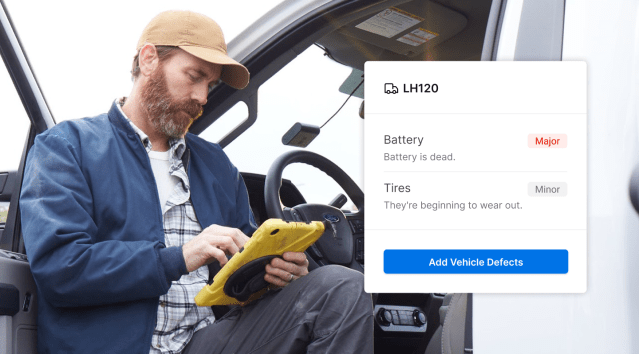
An eDVIR, or digital DVIR, is an electronic Driver-Vehicle Inspection Report that guides a driver through a structured pre- or post-trip inspection and records a vehicle’s condition. An eDVIR can capture inspection responses, defect details, notes, photos, and signatures. The structured digital format can make those details easier for fleet and maintenance teams to review and search, and make the report available for digital review in moments.
Paper DVIR vs. eDVIR
Paper DVIRs create operational gaps, while eDVIRs make inspection information immediately usable by the right teams. See three ways paper DVIR workflows break down:
- Delayed handoffs. A defect may be recorded before the people responsible for acting on it see the report.
- Unclear information. Handwritten notes and inconsistent forms make defects harder to interpret, prioritize, and document.
- Disconnected accountability. Inspection, repair, acknowledgment, and return-to-service records can remain separate.
With an eDVIR that’s native to a fleet management platform, inspection information can reach the people responsible for reviewing defects and coordinating repairs while the issue is still relevant. An eDVIR can help:
- Get defect information to the right people sooner.
- Reduce incomplete, unclear, or duplicated documentation.
- Give drivers, managers, and maintenance teams one shared record.
- Prioritize safety-critical issues and connect inspections to repairs and service history.
What a connected eDVIR workflow looks like
A connected eDVIR makes an inspection a shared record with context that teams can review, prioritize, and follow up on. Instead of a report moving separately from the driver to the office and then to maintenance, the inspection becomes part of the vehicle’s maintenance record.
| Paper DVIR workflow | eDVIR workflow |
| Delayed handoff | Immediate submission and manager review |
| Risk of incomplete or unclear defect information | Guided inspection templates, structured fields, notes, and photos |
| No shared status | Centralized records and severity-based prioritization |
| Repair information disconnected from inspection data | A clear path from defect to maintenance action |
| No connection to resolution | Repair documentation, acknowledgment, and return-to-service records |
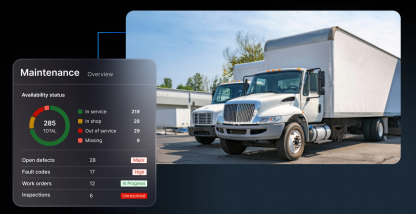
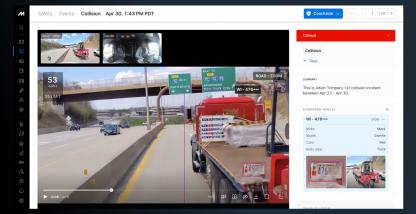
This connected workflow is what Motive Maintenance is designed to support. Inspections completed in the Motive Driver App feed into the Motive Dashboard, where teams review reported defects alongside other maintenance signals and prioritize what needs attention.
With the Motive Maintenance subscription, teams can:
- Turn issues into work orders.
- Track repairs through completion.
- Record service details.
- Confirm resolved defects.
- Update a vehicle’s availability.
Completed work then flows into Service History, connecting the original inspection with the action taken.
What information does an eDVIR capture?
An eDVIR captures the same information as a traditional DVIR, but records it in a structured digital format, making information easy for teams to access and act on. The quality and usability of the data improve, including:
- Structured inspection responses instead of handwritten entries.
- Legible defect descriptions with standardized severity.
- Photos and notes attached directly to the defect.
- Immediate submission and review by fleet and maintenance teams.
- Centralized, searchable inspection history.
What to look for in eDVIR software
The best eDVIR software should do more than replace a paper form. It should connect the driver’s inspection to the workflows that teams use to decide what happens next:
- Connected maintenance workflows. Inspection data should be available to the teams responsible for reviewing defects, prioritizing action, and coordinating repairs. In a connected system, an eDVIR becomes part of the broader vehicle record rather than a standalone document.
- Guided, customizable inspections. Look for step-by-step workflows and inspection templates that can be standardized or tailored to different vehicle and asset types.
- Detailed defect capture. Drivers should be able to record defects with clear descriptions, photos, and severity information.
- Visibility and prioritization. Managers should be able to review submitted inspections quickly, identify severe defects, and understand which vehicles need attention first.
- A closed-loop resolution process. The system should help teams track the status of reported issues, with visibility into repair documentation and return-to-service decisions.
- Centralized inspection history. Records should be easy to access across drivers, vehicles, and maintenance activity, supporting consistent recordkeeping and audits.
How eDVIR fits into the broader maintenance workflow
Digitizing your inspections with eDVIRs is only the first step toward a smoother maintenance operation. Increase the operational value by making sure defect data can flow directly into a connected maintenance workflow, where teams can prioritize issues, create and track repairs, and keep service history accurate.
Learn more about Motive Maintenance to see how it can make your inspection workflow more efficient.
Frequently Asked Quetions
How does an eDVIR move a reported defect into the maintenance workflow?
An eDVIR turns a reported defect into an actionable maintenance issue rather than leaving it in a standalone inspection record. In Motive, defects appear on the Health page alongside other vehicle signals, where teams can prioritize them and start a Work Order.* With a paid Motive Maintenance subscription, teams can create a work order and track issues through resolution.
* Available with a paid Motive Maintenance subscription. Feature availability may vary by plan.
Can eDVIR forms be customized for different vehicles and assets?
Yes. eDVIR software should let administrators create or adapt inspection templates for different vehicle and asset types, including the inspection items, fields, photos, and notes drivers need to complete. Motive supports separate vehicle and asset inspections, customizable forms, and configurable requirements, helping teams standardize inspections without forcing every unit to use one checklist.
Does an eDVIR support the required signatures after a defect is repaired?
Yes. An eDVIR can support the post-repair acknowledgment flow by recording the mechanic’s repair signature and the reviewing driver’s signature. In Motive, teams can resolve defects individually, capture mechanic signatures and notes, and prompt drivers to review corrected defects before signing. Signature requirements can vary by jurisdiction and fleet configuration, so confirm applicable compliance rules.
Who is required to fill out a DVIR?
Commercial motor vehicles drivers are responsible for inspections and for preparing a DVIR when they discover or are told about a safety-related defect or deficiency. Under 49 CFR 396.11, the report is generally prepared at the end of each workday for each vehicle operated. No report is required when no defect is found or reported. Before driving, the driver must also verify that the vehicle is safe to operate and review the last DVIR when applicable under 49 CFR 396.13.