


Every truck has its own maintenance needs, but teams should manage those needs with fleet-wide context. Each vehicle’s mileage, engine hours, inspection results, fault codes, repair history, and parts usage can inform fleet-wide maintenance decisions.
This guide explains how to build a connected truck maintenance program with Motive Maintenance that helps teams identify issues, plan service, and reduce downtime across the fleet.
How to build a truck maintenance schedule
A truck maintenance schedule organizes inspections, scheduled services, repairs, and recordkeeping that keep trucks safe, reliable, and available for work. To build an effective schedule, start with a baseline, then adjust for usage and operational data.
- Start with manufacturer recommendations
Manufacturer recommendations provide a starting point for a truck maintenance schedule. Treat them as a baseline. The same truck can operate differently depending on its routes, loads, climate, and duty cycle.
- Use time, mileage, and engine hours
For the most accurate schedule, track three maintenance intervals for every truck. Schedule the service for when the first condition is met. Add service intervals by tracking when:
- A set amount of time has passed, tracked by days, weeks, or months.
- The truck reaches a target mileage.
- The truck reaches a target number of engine hours.
- Factor in duty cycle and operating conditions
A truck maintenance schedule should reflect the conditions that place the most stress on each truck. Review these operating factors to determine whether a vehicle needs more service than the standard OEM interval suggests:
- Highway vs. stop-and-go driving. Trucks with frequent starts, stops, and idling may require a different schedule than trucks with steady highway mileage.
- Heavy loads. Regularly hauling heavy loads can increase wear.
- Construction use. Trucks operating on job sites may deal with dust, debris, vibration, uneven surfaces, and extended idle time.
- Extreme weather. If trucks operate in extreme heat, cold, or humidity, account for the added stress on batteries, fluids, tires, cooling systems, and other components.
- Vehicle age and mileage. Older or higher-mileage trucks may need more frequent inspections and close monitoring.
- Build the schedule
Avoid creating a separate schedule for every possible condition. Instead, use the operating factors to make targeted changes:
- Keep the OEM interval when the truck’s conditions match the standard use case.
- Add interim inspections when a duty cycle increases wear or the consequences of failure are high.
- Shorten selected service intervals when the OEM provides severe-duty guidance or your maintenance history shows that the standard interval is too long.
- Reassess the schedule when routes, loads, seasons, vehicle assignments, or recurring repair patterns change.
- This approach keeps your schedule practical and responsive to each truck’s needs.
How to prioritize truck maintenance issues
An effective truck maintenance program helps teams balance recurring maintenance while prioritizing urgent issues. Use the practices below to help teams rank priority.
- Use driver inspections to identify defects
Pre- and post-trip inspections can reveal problems that calendar-based schedules miss. A truck may be weeks away from its next scheduled service but still have a defect that needs attention before it goes back on the road.
Review inspection results promptly, and give every reported defect a clear next step. This prevents reported defects from being overlooked.
- Catch emerging problems with fault codes
When a fault code is reported, review its severity, the affected truck’s current availability, and any related inspection findings. Then decide whether to address it immediately or include it in the truck’s next scheduled service.
- Decide what needs attention first
A documented triage process helps the team decide which service to prioritize. Use these factors to make decisions:
- Safety risk. Prioritize issues that could affect the safe operation of the truck or put people at risk.
- Compliance status. Check whether the defect falls under a regulatory or out-of-service requirement before postponing it.
- Likelihood of breakdown. Consider the fault code, defect, operating conditions, and repair history to decide when assessing breakdown risk.
- Vehicle availability. Check whether the truck is already out of service, still operating, or needed for an upcoming route or job.
- Repair urgency. Factor in the consequences of waiting, any service or compliance deadlines, and whether the issue is worsening.
- Opportunity to bundle work. When the issue isn’t urgent, consider combining it with an upcoming service to avoid a second shop visit.
- You don’t need a complicated scoring system. Start with safety and breakdown risk, then use availability and timing to plan the work.
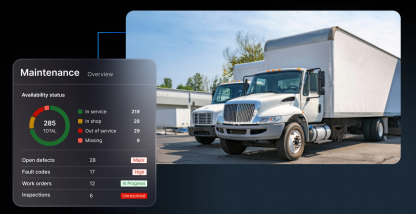
Teams can use the Health view in Motive Maintenance to see a list of vehicle and asset availability, defects, fault codes, and next scheduled service prioritized by the most urgent issues.
How to make sure maintenance repairs are completed
After identifying a maintenance issue, teams need to assign the repair, coordinate the work, and confirm that the original issue was resolved. Manual handoffs can interrupt that process. Use automation to connect each step of your repair workflow.
In Motive Maintenance, the Work Orders workflow connects defects, fault codes, and scheduled services to repair tasks, shop assignments, parts, labor, and resolution status. Work Order Automations can also create work orders from defined triggers to keep important repairs visible.
Use these practices to make sure service is completed efficiently.
- Bundle related issues and upcoming services
When a truck goes to the shop, review its other open defects, fault codes, and upcoming scheduled services. If the work can be completed during the same visit, bundling related work can reduce repeat shop visits and prevent additional downtime. But don’t bundle work that delays an urgent repair. Instead, use your triage process to determine what needs immediate attention. You can always add lower-risk work when there’s a better opportunity to complete it.
- Coordinate in-house and external repairs
Manage the repair process differently based on where the work happens, but keep records in sync with these practices:
- In-house shop. Assign the work to a technician, confirm that the required parts are available, and track the repair through completion.
- External vendor. Share a clear scope of work, coordinate the service dates, and capture the job details when the invoice is received.
- Hybrid operation. Keep one record for the truck even when some repairs happen internally and others are sent to a vendor.
In every case, give each repair a clear owner, status, and next step to increase accountability.
- Confirm what was actually repaired
Don’t close a repair solely because a truck comes back from the shop. Review the work performed, and confirm which issue it resolved. Record the parts, labor, and other costs, then leave any unresolved issue open so the team can follow up on it.
How to track truck maintenance records
Keep consistent records to help teams plan future work with reliable data. Consistent records also support better fleet-wide maintenance decisions.
- Include these fields on every truck maintenance record
Use the same core fields for every record so the team can compare maintenance history across vehicles and over time.
| Record item | Why it’s needed |
| Service date and mileage | Confirms when work was completed |
| Engine hours | Supports hour-based service intervals |
| Service performed | Shows what was actually done |
| Parts and labor | Supports cost tracking |
| Issues found | Identifies recurring problems |
| Next service due | Keeps future work visible |
| Warranty details | Helps prevent paying for covered repairs |
Record this information when the service happens, rather than reconstructing it later from invoices, emails, or memory. Include enough detail for another maintenance team member to understand the truck’s history and next steps.
- Use maintenance history to find recurring problems
Once you have consistent records, review them for patterns, such as repeat failures, frequent part replacement, or vehicles that need more work, across trucks and vehicle groups.
Use these patterns to inform day-to-day decisions. You might need to adjust a service interval, inspect a component more often, or assess whether a vehicle is becoming too expensive to keep in service.
In Motive Maintenance, Service History records completed service tasks and links them to work orders. You can use the Operating Cost feature to see where truck maintenance costs are trending.
Best practices for planning truck parts and inventory
A truck maintenance schedule is only useful when the parts needed for a repair are available before the work begins. Parts delays can keep a high-priority truck out of service.
To plan inventory right, use the guidelines below.
Identify critical parts for your fleet mix
Start with the parts most likely to delay a repair or keep a high-priority truck out of service. Look for parts that:
- Are issued frequently for your vehicle groups.
- Have long or unpredictable supplier lead times.
- Have previously delayed a truck’s return to service.
- Are needed to address safety-related or high-priority defects.
Then set stocking priorities for each shop location. Keep on hand parts that are frequently used, difficult to source quickly, or could delay an urgent repair.
Set minimum stock levels and reorder thresholds
Set a minimum stock level for each critical part at every shop. That minimum should reflect:
- How quickly the part is used.
- How long restocking takes.
- Which vehicles the shop supports.
- Whether another location or supplier can provide the part quickly.
Review stock levels when your fleet mix changes or a shop begins maintaining more makes and models, vehicle classes, or equipment types.
Tip: Reorder thresholds should account for parts already committed to open repairs. Otherwise, teams might count on stock that is not available.
Record parts against the repair
Record each part when it’s used, and link its part number, quantity, and cost to the truck, service task, and work order.
Accurate parts records help maintenance teams spot recurring component problems, compare repair costs, and improve future purchasing decisions.
Motive Maintenance’s Parts & Inventory capability includes a parts catalog, shop-level stock tracking, and reorder alerts. These features help teams manage inventory:
- Avoid double-committing a part. When a part is added to a work order, Motive can check available stock and reserve it against the repair.
- Prevent repair delays. Motive sends low-inventory alerts to help avoid out-of-stock issues.
- Reduce manual inventory work. When a work order is completed, the part is deducted from inventory, and its cost flows into operating cost records.
How to keep truck maintenance on schedule
When vehicle data and shop workflows stay connected, teams can identify recurring problems, plan shop capacity, and address issues before they lead to unplanned downtime.
Motive Maintenance helps teams manage repairs and make better maintenance decisions across your fleet. Want to learn more? Schedule a demo.
Frequently asked questions
How do you know whether a fault code means a truck should come off the road?
A fault code alone doesn’t determine if a truck is safe to drive. Review the code’s severity with inspection findings, symptoms, current availability, and compliance or out-of-service requirements. If an issue could affect safety, follow the advice of your qualified technician and regulatory procedures before dispatching. Motive Maintenance’s Health view combines fault codes with defects and availability to support triage.
How should we calculate truck maintenance cost per mile?
Calculate truck maintenance cost per mile by dividing maintenance spend over a period of time by the miles driven in that same period. Track parts, labor, vendor charges, and credits consistently, then compare results for different vehicles, shops, components, and time periods. Motive Maintenance’s Operating Cost view can help you break down maintenance costs.
How can fleet managers manage maintenance across multiple shops?
Fleet managers can manage maintenance across multiple shops by giving each location a clear view of the vehicles and work assigned to it, while maintaining a centralized view of all fleet maintenance activity. A centralized view makes it easier to coordinate repairs when a truck moves between locations and helps prevent duplicate or missed work.
What does fleet maintenance software replace?
Fleet maintenance software may replace some spreadsheets or point solutions, but its main value is keeping the maintenance work and records connected. It can reduce manual tracking by giving teams one workflow to assign repairs, document completed work, and review repair history and costs.
Where should we start modernizing if our fleet maintenance records are spread across multiple systems?
Start by standardizing the fields you need for each truck. Then define one process for schedules, inspections, repairs, and records. Bring in the most important existing data first, including open issues and next service dates. Once that information is current, use fleet maintenance software to keep teams working from the same vehicle record.