

Landscaping dispatch changes as soon as crews leave the yard. A vehicle may start late, a customer may need an updated arrival time, equipment may be at the wrong jobsite, or an urgent request may change the day’s priorities. A static schedule can show what was planned. Dispatch software with GPS visibility helps dispatchers manage what is happening in the field.
What is landscaping dispatch software?
Landscaping dispatch software helps office teams assign, monitor, and update field work as crews move between jobs. The right system connects dispatch details with live vehicle location, estimated arrival times, driver communication, and equipment context.
That is different from customer scheduling software, which may manage recurring services, customer records, appointment windows, estimates, invoices, and service history. Dispatch software focuses on field execution and visibility. Many operations use both systems.
Motive focuses on fleet dispatch, vehicle, driver, and equipment visibility; teams may pair it with a separate scheduling or job-management system as needed.
Is basic GPS tracking enough for landscaping dispatch?
No, it’s not. A map is useful, but dispatchers also need to know which vehicle is nearest to a job, whether a crew has arrived, whether equipment is available, and what happened on a completed trip.
Motive GPS Fleet Tracking provides real-time and historical vehicle data, geofences, trip context, and Fleet View. Connected fleet data can help dispatchers move from asking, “Where is the truck?” to deciding, “What action should we take next?”
What features should I look for in landscaping dispatch software?
- Dispatch assignments and progress
Look for a central dispatch view to organize assignments, assign a driver or vehicle, track progress, and update dispatch details. Status labels, messaging, and document workflows can help reduce manual coordination.
- Live GPS and more useful ETAs
When updates are delayed, inconsistent, or not live, dispatchers may not know whether an assigned vehicle is on the way, at a jobsite, or somewhere unexpected. That uncertainty can make it harder to coordinate crews, communicate accurate ETAs, and investigate delays.
Motive Fleet Dispatch uses live GPS data to give dispatchers a more current view of vehicle locations, along with dispatch updates, predicted routes, and estimated arrival times. Historical trips and geofences can help teams review completed work, investigate delays, and confirm activity at yards or jobsites. These features support more informed ETA communication, but they do not guarantee arrival times or automatically optimize every landscaping route.
- Driver and field workflows
Dispatch visibility is more useful when field teams can act on the information. Look for a mobile workflow that supports:
- Dispatch details and status updates
- Messaging with dispatchers or teams
- Inspections and defect reporting
- Forms, photos, notes, and documents
- Required tasks at a stop
The Motive Driver App supports dispatch, messaging, vehicle inspections, documents, and forms, depending on configuration. Its dispatch workflow can provide stop details, status updates, task completion, and document capture.
- Multilingual support for field teams
Many landscaping organizations operate across multiple crews and may need multilingual field workflows. The Motive Driver App supports English, Spanish, and French in applicable experiences, and Motive provides driver materials in those languages. Applicable Motive Dashboard workflows support U.S. and U.K. English, Mexican Spanish, and Canadian French. Language settings depend on the product surface and workflow.
Language availability varies by product surface, region, and workflow. Confirm language coverage for the dispatch, dashboard, messaging, and import workflows your team will use.
- Vehicle, trailer, and equipment visibility
Landscaping dispatch often depends on more than the truck. Trailers, mowers, and other equipment may need to be available at the right jobsite.
Motive brings vehicle and asset data together through Fleet Management, Equipment Monitoring, and Asset Tracking. Depending on the equipment and configuration, teams can use location, geofences, alerts, and usage data to assess availability and review last-known location.
- Vehicle readiness and maintenance context
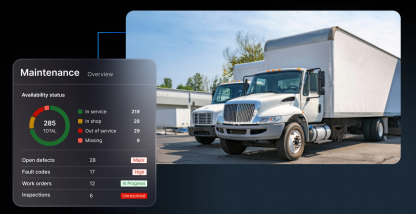
Dispatchers need to know when a vehicle is unavailable or awaiting critical repairs before assigning it. Maintenance status, fault-code information, inspections, and service schedules can provide dispatch context, depending on the product and configuration.
Maintenance work orders and repair history may live in a dedicated maintenance process. Dispatchers still benefit from knowing whether an asset is available for the day.
How GPS visibility helps dispatchers manage the day
- When a crew is running late
A dispatcher can check location and trip context, review the ETA, and decide whether to update the customer or adjust the next assignment.
- When an urgent job comes in
Dispatch visibility can help the office identify nearby vehicles, check equipment availability, and send updated instructions to the field.
- When equipment is missing
Location history and geofence alerts can help determine whether an asset is at a yard, jobsite, or in transit. This can make it easier to locate missing equipment.
- When a customer asks for an update
Shareable location and ETA information, arrival records, photos, notes, or dispatch documents can give the team current information to share.
What landscaping dispatch software may not replace
Start by separating fleet execution from customer scheduling and job management. A separate system may still be needed for recurring mowing schedules, customer appointment windows, crew calendars, estimates, invoicing, customer history, or job costing.
The practical question is how well your systems connect the customer schedule with the fleet and field data needed to execute the work.
Questions to ask before choosing a platform
- Can dispatchers see vehicles and equipment in one view?
- How quickly does location data refresh, and is historical trip data available?
- Can teams assign drivers, vehicles, and assets to active dispatches?
- Does the mobile workflow support messages, inspections, forms, photos, and documents?
- Can the team share ETAs or locations with customers?
- Can maintenance or defect status inform dispatch decisions?
- Does language support cover the workflows field teams use?
- Does it integrate with scheduling, payroll, accounting, or field-service software?
Equip your crews for efficiency
Landscaping dispatch software is most useful when it connects planned work with what is happening in the field. GPS visibility shows teams where vehicles and assets are. Dispatch workflows help teams communicate with the field, adjust priorities, confirm progress, and coordinate equipment.
See how landscaping operations teams can improve dispatch and fleet visibility with Motive. Request a demo today.
Frequently asked questions
Is landscaping dispatch software the same as landscaping scheduling software?
No. Scheduling software generally manages customer jobs, recurring services, and appointment windows. Dispatch software helps teams assign, monitor, and update field work, and communicate with crews.
Can GPS tracking help landscaping dispatchers?
Yes. GPS can provide real-time and historical location data, geofences, trip context, arrival and departure visibility, and more informed ETA updates.
Can Motive replace landscaping scheduling software?
Motive is not a replacement for every customer scheduling or job-management workflow. It provides the fleet dispatch, vehicle, driver, and equipment visibility layer that complements those systems.
Does Motive support multilingual landscaping teams?
Motive supports English, Spanish, and French in applicable Driver App experiences and provides driver materials in those languages. Confirm language coverage for the specific dispatch and administrative workflows your team will use.
Can dispatch software track landscaping equipment?
Yes. Some platforms can track landscaping equipment. Before choosing a platform, confirm that it supports trailers, powered and unpowered equipment, geofences, alerts, usage data, and the required hardware.