
A landscaping company can have a full schedule and still lose time before the first job is complete. A worker is missing a required document. A timecard is incomplete. The assigned vehicle is unavailable. A supervisor is calling the office for information that should already be visible.
For many landscaping businesses, these gaps become harder to manage as the number of crews, branches, vehicles, and job sites grows. Crew management software connects workforce information with daily work, giving leaders visibility into readiness, time, training, coaching, and fleet activity.
Customer scheduling software solves a different problem. Scheduling organizes recurring services, appointment windows, and customer commitments. Crew management helps answer a different question: Are the people, time, and field resources ready to deliver the work today?
What is landscaping crew management software?
Landscaping crew management software helps managers coordinate workforce readiness and daily field activity. Some crew management platforms can connect workforce status with relevant fleet data before work begins.
Crew management software can support qualification documents, timecards, training, coaching, and mobile field workflows. Connecting workforce status with vehicle context gives managers a shared view for daily reviews, time entry, and field follow-up.
Why a crew calendar is not enough
A calendar can tell an operations manager which crew is assigned to which property. It may not show whether the workers are trained for the work, whether their required documents are current, how much time they have recorded, or whether a supervisor needs to follow up on a coaching issue.
That visibility matters as a landscaping company grows. Seasonal hiring, multiple branches, and different vehicles or equipment can make consistency more difficult for some landscaping businesses. Office teams can end up piecing together information from calls, spreadsheets, paper forms, and disconnected systems.
Connecting those details can give managers more visibility into productivity, service quality, and margin-related issues.
The capabilities that matter most
Workforce readiness and status in one place
Before a crew starts work, managers need to know whether the people assigned to the day are ready. That may include qualification documents, training status, role information, and supervisor follow-up tasks.
Motive Workforce Management can connect workforce information with training, coaching, qualifications, and time tracking. It can support consistent processes across branches and supervisors while leaving customer appointment management to a dedicated system.
Timecards that reflect the workday
Time records are more useful when they include context. Clock-in and clock-out records, job types, notes, approvals, and payroll handoffs can help managers review time entries and identify gaps.
Motive Integrated Timecards support workforce time tracking and may connect timecard records with relevant trip data and payroll workflows, depending on configuration. It can complement payroll and accounting systems, but it is not the same as payroll processing or job-costing software.
Consistent coaching for drivers and eligible workers
A growing landscaping company may need repeatable ways to coach drivers and eligible workers. Repeatable training and coaching workflows help managers reinforce expectations, recognize improvement, and follow up on recurring issues.
Motive Driver Coaching supports safety and performance workflows for drivers and eligible workers. Where available, automated coaching experiences may be offered in English and Spanish. Language and workflow availability can vary, so the specific configuration matters.
Fleet context without losing the people focus
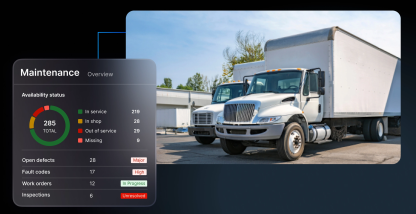
Crews depend on vehicles, trailers, and equipment to reach each property and complete the work. Workforce records are more useful when managers can connect them with relevant vehicle or fleet activity.
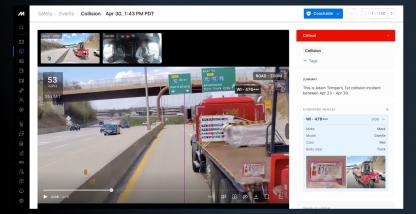
Motive Fleet Management provides vehicle and relevant trip context. This does not necessarily track each worker’s location. The distinction matters. Crew-management software focuses on people, time, readiness, and coaching. Fleet systems provide visibility into vehicles and assets.
Field records and manager review
Digital forms, inspections, photos, notes, and checklists make field information easier to review. Managers can review incomplete timecards, missing documents, recurring coaching needs, and training status.
How connected crew management works during the day
Before work begins
Review worker readiness, qualification gaps, training status, and timecard requirements before crews head out. Vehicle and equipment availability adds fleet context.
During the workday
Workers can record time, complete supported mobile workflows, and add relevant notes or photos, depending on configuration. Managers can review a shared record instead of piecing together updates from paper forms and status calls.
After timecards are submitted
Review entries, approvals, exceptions, and recurring needs. The information can support payroll handoffs, training decisions, and workforce reviews.
Crew management is not the same as scheduling software
The two systems can work together, but they serve different purposes. Dedicated landscaping scheduling software may organize recurring services, customer calendars, appointment windows, work orders, and planned routes. Crew management focuses on workforce readiness, training, qualifications, coaching, timecards, and operational follow-through.
A landscaping business may still need dedicated systems for estimates, quotes, invoicing, payroll processing, job costing, and customer history. Motive products and integrations may support dispatch, assignment, routing, and estimated-arrival workflows, depending on configuration. The right setup may use more than one platform. The goal is to connect the systems and records managers rely on throughout the day. Available integrations depend on the products and workflows selected.
Where Motive fits
Motive connects workforce and fleet visibility for field operations. Workforce Management, Integrated Timecards, Driver Coaching, and Fleet Management can give leaders a connected view of people, time, training, coaching, and vehicles supporting daily work, where the selected products support those workflows.
For a landscaping company, these capabilities may support readiness reviews, timecard context, and a more consistent operational record across branches. Motive Workforce Management may work alongside customer scheduling, payroll, accounting, and field-service systems, depending on available integrations. Confirm available integrations and workflow coverage for your operation.
Six questions to ask before choosing a platform
- Can managers review workforce status, available qualification documents, training, and coaching in one workflow?
- Are qualification documents and expiration information easy to review?
- Do timecards support job types, notes, approvals, and payroll handoffs?
- Can workforce records connect to relevant vehicle or trip context?
- Does the mobile experience support forms, inspections, photos, and notes?
- Can the platform integrate with scheduling, payroll, accounting, and field-service systems?
Connecting people, vehicles, and operations
Landscaping crew management software helps leaders connect the people doing the work with the time, training, coaching, and fleet context that shape the workday. A shared workflow can help managers identify gaps earlier and reduce manual coordination as the company grows.
See how Motive connects workforce and fleet visibility for field operations. Request a demo.
Frequently asked questions
What is landscaping crew management software?
It is software that helps landscaping companies manage workforce readiness, time, training, qualifications, coaching, and daily field activity.
Is it the same as lawn care scheduling software?
No. Lawn care scheduling software typically organizes customer jobs, recurring services, calendars, and appointment windows. Crew management focuses on the people and operational readiness behind that work.
Can crew management software track worker locations?
Not necessarily. Some systems track people directly, while others focus on vehicle or asset data. Confirm what the platform tracks and what privacy and permission controls apply. Motive primarily provides vehicle, asset, and trip visibility. Depending on configuration, it may associate drivers with that activity. That differs from continuous GPS tracking of individual workers.
Is Motive Integrated Timecards payroll software?
No. Integrated Timecards can support workforce time tracking and payroll integrations, depending on configuration. Payroll processing and job costing remain separate capabilities unless another connected system provides them.
Accordion Header
Accordion Body content