


Moving fleet vehicles and equipment to the shop is only the first step in a maintenance workflow. The next steps determine how quickly the repair moves and how long the asset stays out of service. When teams can’t see who owns a repair, what’s delaying it, or whether the original issue is fixed, maintenance backlogs grow.
The guide explains how maintenance work order software connects each repair to an owner, status, and outcome.
What are maintenance work orders?
A maintenance work order is the record that turns a maintenance issue into a tracked repair or service. Maintenance work order software connects each job to a vehicle or asset, and tracks its status, owner, shop, parts, labor, and cost. Completed work flows into Service History.
Where can maintenance work order tracking break down?
Maintenance backlogs aren’t always caused by a lack of repair capacity. They grow when teams don’t have a clear view of who owns each job, what’s delaying it, and whether the repair is complete.
Disconnected tools create handoff problems such as:
- A reported defect or fault code never becomes an assigned work order.
- Related repairs are split across shop visits.
- Status updates sit in email, text messages, or spreadsheets.
- Parts and labor are recorded outside the work order.
- A work order closes before teams confirm that the original issue was resolved.
- Completed work doesn’t flow into Service History or cost data.
These gaps show why effective maintenance work order software should do more than store requests. It should connect the original issue to an owner, repair status, the work performed, and a verified outcome.
What to look for in maintenance work order software
Choose maintenance work order software that tracks a repair from issue to completion.
| Capability | What it supports | Why it matters |
| Issue-linked work orders | Connects a repair to the reason that started it. | Better context and fewer missed issues. |
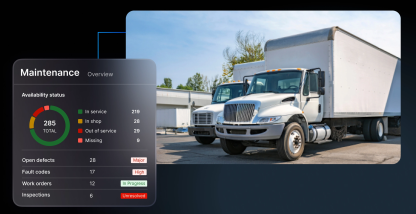
| Prioritized maintenance view | Brings availability, defects, fault codes, scheduled services, and open work orders into one view. | Easier for teams to prioritize jobs. |
| Clear ownership and status tracking | Assigns an owner and tracks defined statuses. | Fewer stalled jobs and clearer next steps. |
| Support for internal and external shops | Supports repairs handled by internal or external shops. | More consistent process across in-house and vendor repairs. |
| Vendor invoice capture | Converts invoice line items into service tasks with parts, labor, and cost data. | Less manual entry and more complete repair records. |
| Parts and inventory tracking | Links parts to the work order and tracks inventory for internal shops. | Fewer parts-related delays and more accurate repair costs. |
| Resolution confirmation | Records which original issues were fixed before the work order closes. | Unresolved problems stay visible when a job closes. |
| Service history and cost reporting | Connects completed work history and operating cost. | Easier review of past repairs, cost trends, and asset performance. |
| Maintenance automations | Creates work orders from defined fault-code, inspection, or scheduled-service triggers. | More visibility for critical issues. |
With Motive Maintenance, teams can create and track maintenance work orders from issue detection and assignment through completion. Each work order keeps the details together in one record. Teams can confirm which issues were resolved before closing the order. Completed work flows into Service History and Operating Cost.
Best practices for tracking maintenance work orders
A consistent maintenance work order process helps keep repairs moving from issue to completion by:
- Preserving the issue that triggered the repair.
- Keeping ownership and status clear.
- Capturing the cost of the work.
- Confirming whether the original issue was resolved.
Use the best practices below to streamline your own maintenance operation.
| Lifecycle stage | Best practice | Why it matters |
| Detect | Record how the job started. Was it an inspection defect, fault code, scheduled service, or manual report? | The repair starts with enough context to act. |
| Triage | Review severity, asset availability, and existing work orders to set priorities. Bundle compatible work when possible. | Urgent work gets attention first. Teams reduce duplicate jobs and repeat shop visits. |
| Assign | Set an internal owner and route the work to an in-house or external shop. | Accountability is clear from request to completion. |
| Execute | Keep the status current (such as open, in progress, waiting for parts, or completed). | Managers can identify stalled work and take action. |
| Record | Add service tasks, parts, labor, invoice details, and cost. | The record reflects what was repaired and has enough data to be useful. |
| Verify | Confirm which original issues were resolved before closing the order. | Unresolved problems stay visible for follow-up. |
| Learn | Use completed work to build service history and operating cost data. | Complete repair records support better maintenance and cost decisions. |
Build a strong maintenance work order process with Motive
When maintenance work orders live in one connected system, teams can reduce manual handoffs and build Service History for better maintenance and cost decisions.
Ready to manage maintenance work into one system? Explore Motive Maintenance to see how you can optimize maintenance operations.
Frequently asked questions
Can I use Motive to track maintenance work orders?
Yes. Motive Maintenance lets teams create and track work orders from inspection defects, fault codes, scheduled services, or manually reported issues. Teams can assign repairs to internal or external shops, record service tasks, parts, labor, and invoice details, and confirm which issues were resolved before closing.
What are the benefits of using maintenance work order software for my fleet?
Maintenance work order software connects reported issues with shop workflows and spending. A central system can reduce manual coordination, help managers identify delayed work, and keep maintenance records complete. This creates a consistent process for moving work from request to resolution and informing future operations.
What is the first step for fleet managers just starting to use maintenance work order software?
The first step is to choose one repeatable maintenance workflow and define its intake, owner, status, and closure criteria. In Motive, start in Health Insights, where teams can review prioritized defects, fault codes, scheduled services, and open work orders before creating a work order. Health Insights are available with a paid Motive Maintenance subscription. Feature availability may vary by plan.
Is Motive’s maintenance work order software a good fit for organizations with large fleets?
Yes. Motive Maintenance is especially useful when teams need to coordinate maintenance across many vehicles, assets, shops, and roles. It connects vehicle and asset health with shop workflows in one system. Health brings prioritized maintenance signals into one view. Work Orders track repairs, and permissions control access to maintenance data.